Split the clip and move it by long press
to rearrange its order
Tap the square button between clips
to move to transition menu
Tap Spread Layer button
to spread all layers for easier editing
Tap clip and enter Speed to adjust speed
Add trending captions and stickers
You can extract and use the music
only from your video
Customize the effect speed, strength,
and more--just for your video
Tap filter in Filter menu
to adjust the intensity
Try different designs of mosaics
in Mosaic menu
Upload the photo/video on the video
and composite it using chromakey
Remove the background
and create your own sticker
Add animations
to clips, stickers, and text
Adjust the clip size
and select a great background in BG settings
Press the cover button on the left of the clip
to easily create a thumbnail image
Basic
VITA app (version 233.3.0 or later) is available on Mac devices with M1 chips. Search for VITA in the App Store on Mac devices with M1 chips.
VITA app is not supported on Windows PCs and Mac devices without the M1 chip. We will do our best to provide PC versions in the near future.
Import
Importing a video may take longer if the codec is not supported by the device or if the video has a very high frame per second (fps).
Check the details of the video you wish to import and try again.
Send an emailProject
A project is saved automatically whenever the Apply (✓) button is pressed within a project or when the Back (←) button is tapped after finishing your editing.
Send an emailThe warning is displayed when the source clip of a saved project was deleted or moved to another location.
Move the clip back to the original location or restore the deleted file to recover the project.
Send an emailSorry. Deleted projects cannot be recovered.🥲
Send an emailSorry. If the app is deleted and reinstalled, previously saved projects cannot be recovered.🥲
Send an email-
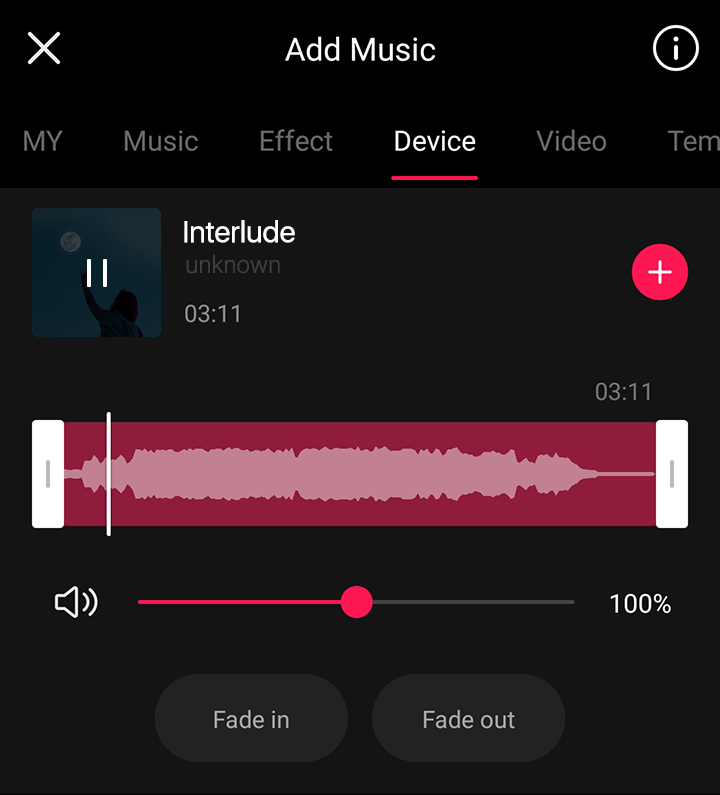
1. Import music from your device
Import the music saved on your device by tapping “Music > Device.”
Template
If you are unable to use templates, tap the “:” button on the top right and press the “Report” button to write a report email. The VITA team will review the email as soon as possible to solve the issue.
Export
Please check the following.
- 1. The app must not be closed or the device locked while exporting is in progress.
-
2. The device must have free storage that is larger than the size of the
video to export. You can check the expected size of the exported video
through the Resolution setting button on the left of Export.
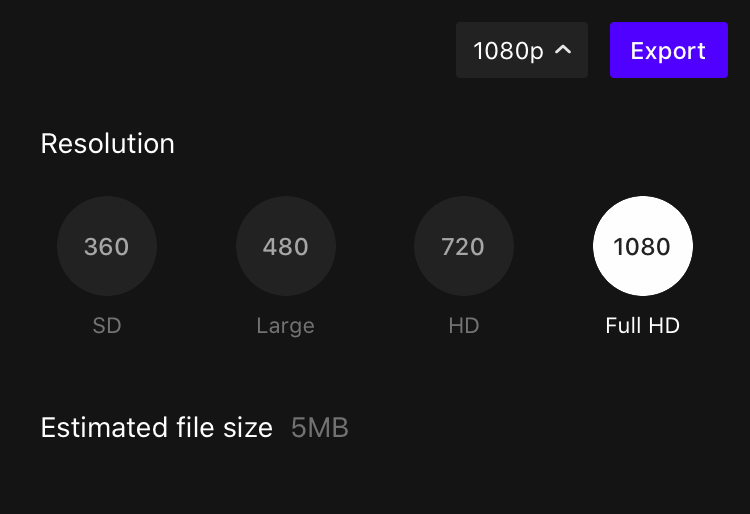
Please check the following and try again.
- 1. Reboot the device and try again.
- 2. Lower the resolution and try again.
If the problem persists even after following the above guidelines, press the “Send an email” button below to send your issue to VITA! The VITA team will review your issue as soon as possible to resolve the matter.
Send an email4K video importing and exporting is available only on mobile devices that support 4K video shooting and meet the performance requirements.
Even for mobile devices that support 4K video shooting, 4K video importing and exporting may be unavailable due to insufficient performance requirements.
Please use a lower video resolution to import 4K videos.
Send an emailError
The following issues may disrupt you from viewing the content,
-
1. Network connection failure
The content may not be exposed if the network failed to connect. Make sure you have a stable network connection, exit the app completely, and try running it again.
-
2. Incorrect country/region in settings
The content may not be exposed if the country setting is incorrect. Check your region setting again in “Settings > Country/region,” exit the app completely, and try running it again.
The process of saving a video generates many cache files, and a message may warn that the device does not have enough storage space. The generated cache files are deleted automatically once the file is saved.
The device will need more free storage space to solve the issue. Check your remaining free storage space in Settings and delete any unnecessary apps or media to secure more storage space.
Send an emailThe app may crash (suddenly exit or close) due to various causes and reasons, and it is difficult to identify the exact cause and solution. Please check the following and try them first.
- 1. Install the latest version of VITA from the play store (Play Store link)
- 2. Secure enough free storage space on your device
- 3. Reboot the device
If the issue persists even after trying 1 to 3, press the “Send an email” button below to send your issue to VITA. Including the following information will help us identify and resolve the issue.
A detailed description of the app’s behavior before it crashes (performed features, content, etc.)
A video recording of the screen before the app crashes
Send an emailCopyright
Templates are user-created content. Using them for commercial purposes may lead to copyright issues.
Send an email
Music, Styles, effects, stock videos, text, stickers(excluding GIPHY), filters, transitions, animations, background images and Voice Changer contents provided by VITA may be used without issues. They are free to use for commercial use.
However, VITA’s content may only be used for videos created using VITA. Using VITA’s content for other apps or services is a violation of the Terms of Service and may lead to legal sanctions.
GIPHY is not provided by VITA, so copyright issues may arise if you use it for commercial purposes. For more information on GIPHY copyright, please refer to the GIPHY User Terms of Service.
Send an emailThe templates, text, stickers, and frames available in the VITA Project>Thumbnail feature may be used for commercial purposes.
Send an emailYou may use them for contests and other promotional materials if you exclude all templates that may violate copyrights.
Send an emailTo resolve a copyright infringement report and use the video for commercial purposes, please check the following information.
-
1. Review the templates used in the uploaded video
If you have received a copyright infringement report using sound sources available in the VITA Music tab, please check if you used VITA templates for the video. As VITA templates are created by users without restrictions, they may violate other copyrights if used commercially.
All of VITA's content other than templates mentioned above should not cause any copyright issues. If you still receive a copyright infringement report, you may file an objection directly on social media.
Send an email